Description
AbleNet Buddy Button – Durable Single Switch for Assistive Technology
A switch should be easy to find, comfortable to activate, and reliable enough for everyday use. The AbleNet Buddy Button is designed with these needs in mind, offering a durable single-switch solution with a generously sized activation surface.
With a 2.5-inch (6.4 cm) diameter surface, the Buddy Button gives users a large and clearly defined area to press. This can be particularly useful for individuals who have difficulty with small buttons or need a straightforward external switch for accessing compatible technology.
The switch requires only a light touch to activate and provides both tactile and auditory feedback. The click and physical response let the user know that the button has been pressed successfully.
A 5-foot (152 cm) cable provides flexibility when positioning the switch, while the 1/8-inch (3.5 mm) right-angle mono plug connects to compatible switch-access equipment.
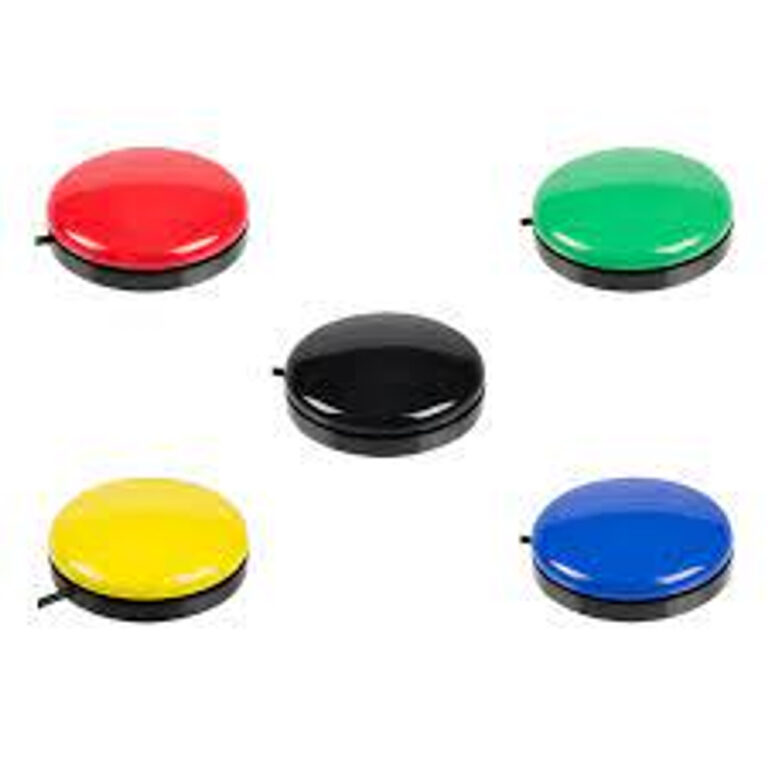
Available in black, red, yellow, blue, and green, the Buddy Button also offers a choice of colors to suit different preferences, environments, or accessibility setups.
2.5-Inch Buddy Button Activation Surface
One of the defining features of the AbleNet Buddy Button is its large 2.5-inch activation surface.
A larger button can be helpful for users who have difficulty targeting small controls. Instead of requiring precise finger placement, the Buddy Button provides a broad surface that is easy to locate and press.
The 2.5-inch diameter surface measures approximately 6.4 cm, providing a comfortable target for many switch-access applications.
This straightforward design can be especially useful when the switch needs to be activated repeatedly throughout the day.
Whether it is placed on a desk, mounted as part of an assistive technology setup, or positioned within reach of a user, the Buddy Button provides a simple and recognizable activation point. visit the official Buddy Button IC makers site
Light-Touch Adaptive Switch
The AbleNet Buddy Button is designed to respond to a relatively light pressure.
Its specified activating force is 5.3 oz (150 gF) ± 1.8 oz (50 gF). This provides a defined pressure requirement while keeping activation accessible for many users.
The switch has approximately 0.05 inches (0.12 cm) of travel before activation, allowing the user to press the surface through a short movement before the switch responds.
For users with different physical abilities, switch selection should always take individual strength, movement, positioning, and control requirements into consideration.
Tactile and Auditory Feedback
Knowing that a switch has activated can be just as important as being able to press it.
The AbleNet Buddy Button provides both tactile and auditory feedback.
When the button is activated, the user receives a physical response along with an audible click. This gives immediate confirmation that the switch has registered the press.
Tactile feedback can be helpful for users who rely on physical sensation to confirm activation, while the auditory click can provide an additional confirmation that is easy to recognize.
This combination makes the Buddy Button a practical choice for a variety of switch-access applications.
Durable and Reliable Single Switch
The Buddy Button is built as a durable, reliable single-input mechanical switch.
Its simple design makes it easy to understand: press the button to activate the connected function.
For users who benefit from uncomplicated controls, a dedicated single switch can be easier to learn and use than a complicated multi-button interface.
The straightforward mechanical design is also well suited to applications where the switch may be activated regularly.
Buddy Button for Assistive Technology
The AbleNet Buddy Button can be incorporated into compatible assistive technology systems as an external switch input.
External switches can provide an alternative method of interacting with devices when standard buttons, keyboards, touchscreens, or other controls are difficult to use.
The Buddy Button’s large activation surface makes it a useful option when users need an easily identifiable physical control.
It can be positioned according to the user’s preferred movement pattern, provided the setup is appropriate for the connected equipment and the user’s needs.
Buddy Button for AAC Access
Single switches can play an important role in augmentative and alternative communication (AAC).
For individuals who use communication technology, an external switch may provide an accessible input for compatible AAC equipment.
The Buddy Button offers a large target and clear feedback, which can be useful for users who require a simple physical activation method.
Depending on the AAC system and software configuration, the switch may support selection or scanning-based access.
Compatibility and programming requirements vary, so the Buddy Button should be used with an appropriate switch interface or communication device.
Buddy Button for Computer Access
The Buddy Button can also be used as an external switch in compatible computer access systems.
For someone who has difficulty using a conventional mouse or keyboard, switch access can provide an alternative way to interact with certain computer functions.
The 2.5-inch button offers a larger target than many standard computer controls, while the tactile and auditory feedback provides confirmation of activation.
When paired with a compatible switch interface and software, the Buddy Button can become part of an individualized computer access setup.
Buddy Button for Switch-Adapted Toys
The large, colorful design of the Buddy Button can also make it suitable for switch-adapted toys and activities.
Switch adaptation allows a compatible toy or device to be activated through an external switch. This can make interactive play more accessible for children and adults who have difficulty using the toy’s original controls.
The Buddy Button’s simple press-to-activate design makes the relationship between the user’s action and the toy’s response easy to understand.
Its availability in several colors can also make it easier to personalize an activity or create visually distinct controls.
Color Options for Personalization
The Buddy Button is available in five colors:
- Black
- Red
- Yellow
- Blue
- Green
Having different color options can be useful when creating a personalized assistive technology setup.
For children, bright colors can help make the switch visually engaging. In more complex setups, different colors may also help distinguish one switch from another when multiple switches are being used.
Color selection is ultimately a matter of preference and the user’s particular access needs.
5-Foot Cable for Flexible Positioning
The Buddy Button includes a 5-foot (152 cm) wired cable.
This cable length provides useful flexibility when positioning the switch relative to a connected device or interface.
A longer cable can be especially helpful when the user needs the switch positioned in a specific location while the connected equipment remains elsewhere.
The wired design also keeps the setup straightforward without requiring wireless pairing or battery management.
3.5 mm Right-Angle Mono Plug
The Buddy Button uses a 1/8-inch (3.5 mm) right-angle mono plug.
The right-angle connector can help manage cable direction around the connection point, particularly in setups where space is limited.
The connector is designed for compatible switch interfaces and equipment that accept a 3.5 mm mono input.
Before connecting the switch, always confirm that the receiving device or interface supports the appropriate connector and switch input.
Universal Mounting Plate
The Buddy Button includes a Universal Mounting Plate, providing an option for incorporating the switch into a compatible mounting setup.
Proper positioning can make a significant difference in how easily a user can activate an adaptive switch.
A mounting solution can help keep the button in a consistent location and align it with the user’s preferred movement pattern.
For users who need individualized positioning, an occupational therapist, assistive technology professional, or other qualified specialist can help determine the most appropriate mounting arrangement.
Who Can Benefit from the AbleNet Buddy Button?
The Buddy Button may be useful for individuals who need a large, reliable external switch for compatible assistive technology.
It can be considered for users who:
- Have difficulty operating small buttons.
- Need a larger activation target.
- Benefit from tactile and auditory feedback.
- Require an external switch for AAC.
- Use switch-access computer systems.
- Use switch-adapted toys or activities.
- Need a simple single-input control.
- Prefer a colorful or visually distinctive switch.
Because every user has different physical and access requirements, the ideal switch and positioning should be selected based on individual abilities and the equipment being controlled.
Why Choose the AbleNet Buddy Button?
The AbleNet Buddy Button combines a simple design with practical accessibility features.
Its 2.5-inch activation surface provides a large target, while the mechanical pressure switch responds to a relatively light touch.
you may also like some of our products:
The 5-foot cable allows flexible positioning, and the right-angle 3.5 mm mono plug provides a straightforward connection to compatible switch interfaces.
The included Universal Mounting Plate also makes the Buddy Button suitable for mounting within an individualized assistive technology setup.
And with five available colors, users can choose an option that suits their personal preferences or application.
AbleNet Buddy Button Technical Specifications
A Simple Switch with Flexible Applications
One of the biggest strengths of the AbleNet Buddy Button is its versatility.
It can serve as an external access switch across different environments and applications. Whether the goal is communication, computer access, adapted play, or another compatible assistive technology function, the basic operation remains simple: press the button to activate the connected device or function.
The large surface helps make activation approachable, while the click and tactile response provide useful confirmation.
This makes the Buddy Button a practical choice for users who need a straightforward, dependable switch without a complicated control layout.
Designed for Everyday Accessibility
Assistive technology works best when it fits naturally into a person’s daily routine.
The Buddy Button’s simple shape, large activation surface, light-touch operation, and clear feedback are all designed around straightforward switch access.
Its 5-foot cable provides positioning flexibility, while the Universal Mounting Plate supports integration into compatible setups.
Whether used at home, school, work, therapy, or during recreational activities, the switch can provide a consistent external input for compatible devices.
Final Thoughts
Its 2.5-inch (6.4 cm) activation surface provides a generous target, while the pressure-activated mechanical design responds to a light touch.
With a 5-foot (152 cm) cable, 3.5 mm right-angle mono plug, and Universal Mounting Plate, the Buddy Button offers flexibility for different assistive technology setups.










Reviews
There are no reviews yet.