Description
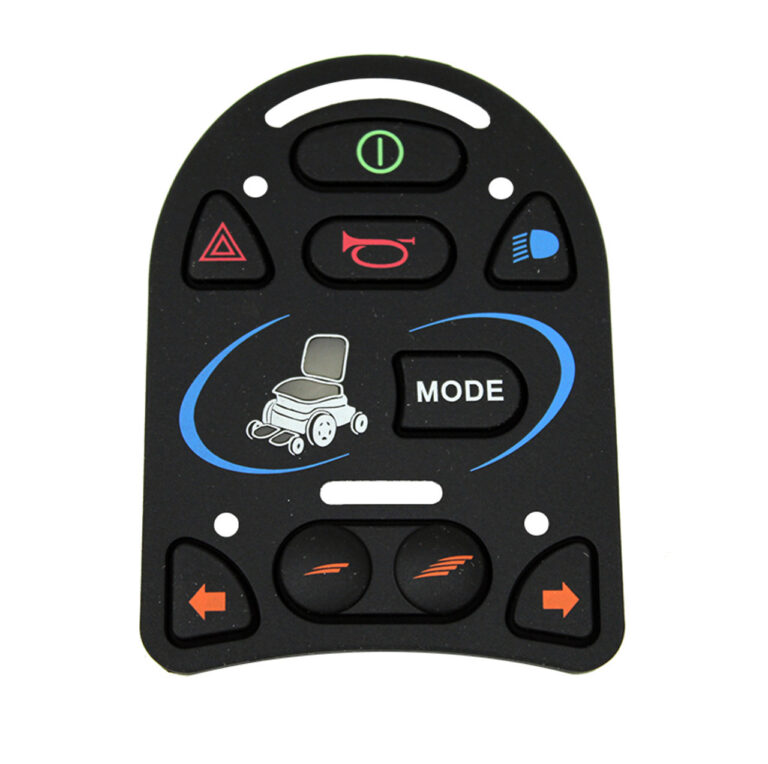
EL JSM-L Keypad for Industrial, Security, and Embedded Control Applications
The EL JSM-L Keypad is a practical 9-button input device designed for applications that require reliable multi-function control. With nine individual buttons available for user input, this keypad provides a convenient interface for industrial equipment, security systems, machine controls, and embedded electronic devices.
A keypad may appear to be a simple component, but it often plays an important role in how users interact with a system. Operators need a dependable way to enter commands, navigate menus, control equipment, or provide security information. The EL JSM-L Keypad offers a straightforward solution by combining multiple momentary switches into a compact input interface.
Each button can be connected to a compatible controller and assigned a specific function. Depending on the application, the buttons may be used for numeric entry, navigation, menu selection, access control, machine commands, or other programmed functions.
The main feature of the EL JSM-L Keypad is its 9-button configuration. Having multiple buttons available allows a system designer to create a more versatile user interface.
Each button can perform a different task based on how the connected system is programmed. For example, the buttons may be arranged for numeric input in a security system or assigned to different machine functions in an industrial application.
The expanded button layout can support a range of common functions, including:
- Numeric input
- PIN entry
- Menu navigation
- Function selection
- Machine operation
- System configuration
- Command confirmation
- Mode selection
- Embedded device control
The exact purpose of each button depends on the controller connected to the keypad. A microcontroller, PLC, access control system, or other compatible electronic device can interpret the signal generated by each button press and perform the required action.
This makes the keypad a flexible choice for custom-designed systems.
How the EL JSM-L Keypad Works
The operating principle of the EL JSM-L Keypad is based on momentary switch input. Each button acts as a switch that temporarily changes its electrical state when pressed.
When a user presses one of the nine buttons, the keypad sends an electrical signal through its connection to the main control system.
A typical process works as follows:
- The user presses one of the buttons.
- The momentary switch creates an electrical signal.
- The connected controller detects the input.
- The system identifies the assigned function.
- The button returns to its original position after release.
This simple operating method allows the keypad to provide direct and responsive communication between the user and an electronic system.
Because the connected controller determines what each button does, the keypad can be adapted for many different applications without changing its basic operating principle.
Industrial Keypad for Machine and Equipment Control
Industrial systems often require control devices that are easy to integrate and simple for operators to use. The EL JSM-L Keypad can be used as part of an industrial control panel or machine interface where multiple functions need to be accessed directly.
The nine-button arrangement provides enough inputs for different commands while maintaining a compact interface.
In an industrial environment, the buttons may be assigned to functions such as:
- Starting a process
- Stopping a function
- Selecting an operating mode
- Navigating machine settings
- Adjusting parameters
- Confirming commands
- Accessing maintenance functions
- Entering numerical values
- Resetting or acknowledging system messages
When connected to a PLC or compatible controller, the keypad becomes part of the larger machine control system. The controller receives the button inputs and manages the corresponding equipment response.
This makes the EL JSM-L Keypad suitable for customized industrial interfaces and equipment that require multiple physical control inputs.
Security Keypad for PIN Entry and Access Systems
A 9-button layout can also be useful in security and access control applications. The keypad can provide an interface for entering numeric codes, selecting access options, or interacting with a security system.
When connected to an access controller, the keypad can send button input signals for processing. The system can then compare the entered information with its programmed access rules.
Potential security applications include:
- PIN entry systems
- Access control panels
- Secure equipment interfaces
- Electronic door systems
- Alarm control interfaces
- Restricted access equipment
- Security configuration panels
The physical button interface can provide a direct way for authorized users to interact with the system.
Embedded System Keypad for Custom Electronic Interfaces
The EL JSM-L Keypad is also suitable for embedded electronic applications. Developers often need compact input devices that can provide direct communication between a user and a microcontroller-based system.
For embedded devices, the buttons can be used for functions such as:
- Menu navigation
- Device configuration
- Parameter selection
- Numeric entry
- User commands
- Function activation
- Diagnostic controls
- Setup and calibration
The flexibility of programmable button assignments makes the keypad useful for custom electronics. Instead of designing individual switches separately, developers can integrate a multi-button input interface into the device.
This can help simplify user interaction and provide a more organized control layout.
Reliable Momentary Switch Input
Each button on the EL JSM-L Keypad operates as a momentary switch. The connected controller monitors the electrical state of the button. This operating style is suitable for applications that require temporary commands or individual user inputs.
For example, pressing a button may:
- Enter a number
- Move through a menu
- Select a machine function
- Confirm a setting
- Activate a command
- Change a system mode
Flexible Voltage Compatibility
The EL JSM-L Keypad can be used with systems designed around different voltage configurations, including 3.3V, 5V, or 12V depending on the overall system requirements.
Depending on the application, the user should consider:
- System operating voltage
- Controller input requirements
- Current capacity
- Wiring configuration
- Connector compatibility
- Electrical protection requirements
Each button has a current requirement of less than 100mA, making it suitable for compatible low-current control applications.
Proper electrical integration is important for reliable performance and should follow the requirements of the complete system.
Multiple Interface and Connection Options
The EL JSM-L Keypad can be integrated into different electronic systems through several connection methods.
Depending on the application, the keypad may use:
- Direct wiring
- Ribbon cable
- Dedicated connectors
Direct wiring may be useful for custom-built equipment where each connection is routed individually. Ribbon cables can provide an organized connection method where multiple signals need to be routed together. Dedicated connectors may simplify installation in equipment designed for a specific keypad interface.
The best connection method depends on the mechanical layout and electrical design of the application.
Benefits of the EL JSM-L Keypad
The EL JSM-L Keypad provides several practical benefits for compatible industrial, security, and embedded applications.
Expanded 9-Button Input
The nine-button layout allows users to access multiple commands from one compact interface. This is useful when a system requires more than a few basic controls.
Flexible Button Programming
Each button can be assigned a different function by the connected controller. This allows the keypad to support numeric entry, navigation, access control, and machine operation.
Compact Control Interface
Multiple physical inputs are combined into one keypad, helping system designers create organized control panels without using excessive space.
Suitable for Different Electronic Systems
The keypad can be used with industrial controllers, microcontrollers, PLCs, access systems, and other compatible devices.
Straightforward User Interaction
Physical buttons provide a direct and familiar method of entering commands and controlling equipment.
Multiple Connection Possibilities
Support for direct wiring, ribbon cable connections, or dedicated connectors gives designers flexibility during integration.
Technical Specifications
Product Name: EL JSM-L Keypad
Number of Buttons: 9
Button Type: Momentary switch
Supported Voltage: 3.3V, 5V, or 12V depending on the system
Current: Less than 100mA per button
Interface Options: Direct wiring, ribbon cable, or dedicated connector
Compatible Controllers: Microcontrollers, PLCs, access control systems, and other compatible electronic controllers
Primary Applications: Industrial control, machine operation, security systems, PIN entry, and embedded interfaces
Applications of the EL JSM-L Keypad
The flexible design of this 9-button keypad allows it to support several types of electronic and control applications.
Industrial Control Panels
The keypad can provide direct access to machine functions and system settings.
Machine Operation Interfaces
Operators can use the buttons to navigate controls, enter commands, or select different operating functions.
Embedded Electronics
Microcontroller-based systems can use the keypad for navigation, configuration, and direct user input.
Custom Control Equipment
Engineers and system designers can assign different functions to the buttons according to their project requirements.
you may also like some of our products:
Installation Considerations
Before integrating the EL JSM-L Keypad into a system, it is important to confirm electrical and interface compatibility.
The controller should be able to receive and interpret the signals generated by the momentary switches. The system voltage should also match the intended operating requirements.
During installation, users should verify:
- Button-to-controller connections
- Operating voltage compatibility
- Current requirements
- Interface type
- Wiring quality
- Connector compatibility
- Controller programming
Why Choose the EL JSM-L Keypad?
A multi-button input device can make a control system easier to operate by placing important commands within a single interface.
Its versatility makes it suitable for industrial controls, machine operation, security systems, and embedded devices.
The ability to integrate with different controllers and voltage configurations also makes it suitable for custom electronic projects.
A Practical 9-Button Keypad for Multi-Function Control
The EL JSM-L Keypad offers a reliable and straightforward solution for applications that need multiple physical control inputs. Its nine-button configuration provides more room for functional commands, while the momentary switch design supports direct and responsive user interaction.
For systems requiring numeric entry, navigation, command selection, or direct electronic control, the EL JSM-L Keypad provides a flexible input interface that can be integrated into a variety of compatible applications .visit the official Permobil makers site











Reviews
There are no reviews yet.