- We ship worldwide—please call us for a quote on international orders.
$109.00
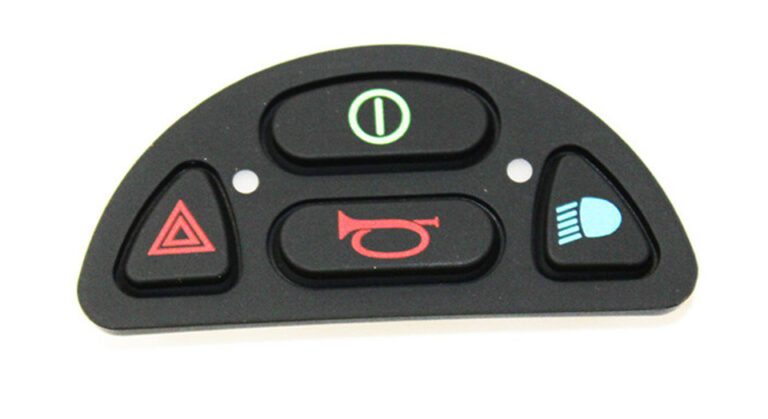
The JSM/CJSM Front Keypad + Lights is a 4-button input device with integrated lighting, commonly used in industrial, security, and embedded system control. The lights provide visual feedback based on user interaction or system status.
The JSM/CJSM Front Keypad + Lights is a compact four-button input device designed to provide reliable manual control and clear visual feedback. Each button operates as a momentary switch, sending a signal to a connected controller when pressed. Integrated LED lighting adds another layer of functionality by helping users see button activity, system conditions, or assigned operating states.
Simple input devices continue to play an important role in many control environments. A well-designed keypad can make it easier for users to send commands, navigate available functions, or interact with connected equipment. The JSM/CJSM Front Keypad + Lights combines four accessible buttons with built-in lighting in one compact control interface.
The illuminated design can improve interaction by providing visible feedback when the system is active or when a particular function requires attention. Depending on the connected controller and programming, the lights may indicate which button has been pressed or communicate different operating conditions.
The JSM/CJSM Front Keypad + Lights can be used in compatible industrial control systems, access control equipment, security applications, and embedded system interfaces. Its straightforward design makes it suitable for applications that require dependable button input without an unnecessarily complex interface.
The JSM/CJSM Front Keypad + Lights is a four-button control interface with integrated LED illumination. It allows users to send input signals to a compatible control system through individual momentary switches.
When a button is pressed, it sends a signal to the connected controller. The controller then processes that input according to the system’s programming and assigned function.
The keypad itself does not need to perform every control function independently. Instead, it acts as an interface between the user and the larger control system.
Each button can be assigned to a specific operation. Depending on the application, the buttons may support navigation, selection, activation, or other control tasks.
The integrated lights provide visual information that can help users understand the current system status or button activity.
The four-button layout provides a simple and organized control arrangement.
Each button serves as an individual input point. Users can press a specific button to activate the assigned function.
A four-button interface can be useful when the system requires several control options but does not need a large or complicated keypad.
The compact layout may help keep frequently used functions accessible without overwhelming the user with unnecessary buttons.
Possible assignments may include:
The actual function of each button depends on the controller and the specific system configuration.
Each button on the JSM/CJSM Front Keypad + Lights operates as a momentary switch.
A momentary switch remains active only while the button is being pressed. When the user releases the button, the switch returns to its normal state.
This type of control is commonly used in electronic systems because it provides a clear and controlled input signal.
When the user presses a button, the keypad sends the input to the connected controller.
The controller may be a compatible microcontroller, programmable logic controller, or another type of electronic control system.
The controller then processes the signal and determines the appropriate response.
This arrangement allows the keypad to function as a reliable input device while the main control system handles the programming and system logic.
One of the key features of the JSM/CJSM Front Keypad + Lights is its integrated lighting.
The built-in LEDs can provide visual feedback based on button interaction or the current operating status of the connected system.
Visual feedback can make a control interface easier to understand.
Instead of relying only on the physical movement of a button, users can receive an additional visual indication through illumination.
Depending on the system design, the lights may be used to show:
The exact lighting behavior depends on how the keypad is connected and programmed within the larger control system.
Visual information can be especially useful when users need to understand the current condition of a system quickly.
An illuminated button or LED indicator can help communicate whether a function is active, selected, or available.
This can reduce uncertainty during operation.
For example, a system may use lighting to indicate which button has been selected. Another configuration may use the LEDs to communicate a broader system condition.
The JSM/CJSM Front Keypad + Lights provides several useful features for compatible electronic and control applications.
The keypad includes four individual buttons for user input.
Each button can send a signal when pressed and return to its original state when released.
Built-in LEDs provide visual feedback for button activity or system status.
The four-button arrangement provides multiple input options while maintaining a simple and organized layout.
Compatible controllers can assign different functions to the individual buttons.
The momentary switch design provides direct interaction between the user and the connected control system.
Depending on the system configuration, the keypad may operate within 3.3V, 5V, or 12V environments.
The button input operates below 100mA per button, although LED lighting may require additional current depending on the configuration.
The keypad may connect through direct wiring, a ribbon cable, or a compatible connector arrangement.
The operating voltage of the JSM/CJSM Front Keypad + Lights depends on the connected system.
Typical system environments may include:
The correct operating voltage should always match the requirements of the connected controller and electronic system.
Voltage compatibility is an important consideration during installation.
Using the wrong electrical configuration may prevent the device from operating correctly or create a risk of damage.
Each button is designed to operate with a current below 100mA.
However, the integrated LEDs may require additional current depending on how the lighting system is configured.
The total electrical requirements should therefore be considered during system design.
This is particularly important when multiple illuminated controls are connected to the same power source or controller.
The JSM/CJSM Front Keypad + Lights may connect to a compatible system through several methods.
Depending on the design, these may include:
The appropriate connection method depends on the equipment and system architecture.
Direct wiring may be suitable for permanent control installations.
Ribbon cables may provide an organized connection between closely positioned components.
Connector-based systems can simplify installation and service when the correct compatible connection is available.
The wiring arrangement should follow the requirements of the connected controller.
Industrial control environments often require simple and dependable user interfaces.
Operators may need to activate functions, select operating modes, navigate controls, or communicate with automated equipment.
The JSM/CJSM Front Keypad + Lights can provide a compact input solution for compatible industrial applications.
Control interfaces are important in access and security equipment.
Users may need to enter commands, select options, acknowledge system conditions, or activate specific functions.
The illuminated design of the JSM/CJSM Front Keypad + Lights can provide both physical input and visual feedback.
For example, LEDs may indicate that a system is active or that a specific operation has been selected.
The exact security application and function assignment depend on the compatible control system.
Embedded systems often require compact input devices that can communicate directly with a controller.
The JSM/CJSM Front Keypad + Lights can serve as an interface between the user and the embedded system.
Each button sends a signal that the controller can process according to the programmed logic.
The buttons can therefore be assigned to functions that match the needs of the equipment.
The integrated lighting can also provide output from the system back to the user.
This creates a two-way interaction:
This makes the keypad suitable for compatible systems that require both input and visible status information.
One of the advantages of a programmable keypad is the ability to assign functions based on the application.
The four buttons do not need to perform the same tasks in every installation.
A controller can assign different operations to each input.
Possible assignments include:
The specific function depends entirely on the programming and control system.
This flexibility allows the same basic four-button interface to support different applications.
A complicated control interface is not always necessary.
Many systems only need a small number of clearly defined input options.
The JSM/CJSM Front Keypad + Lights provides four direct buttons that users can operate without navigating through a large keypad.
The addition of integrated lighting helps create a clearer interaction between the user and the system.
A physical press provides input, while visible illumination can provide information in return.
This combination can create a more intuitive control experience when properly configured.
When selecting a control interface, several factors should be considered.
These include:
The JSM/CJSM Front Keypad + Lights may be suitable for applications that require four momentary input points and integrated visual feedback.
Proper installation is important for reliable operation.
Before connecting the keypad, confirm the voltage and current requirements of the system.
The wiring or connection method should also match the controller and available interface.
The integrated LEDs should be connected according to the appropriate electrical configuration.
Incorrect wiring may affect button operation or lighting performance.
The keypad should also be installed in a location where users can comfortably access the buttons.
In systems with complex electrical requirements, installation should be completed by a qualified technician.
A keypad used regularly should be inspected as part of routine equipment maintenance.
Check the following areas:
If a button stops responding or the lighting behaves unexpectedly, the complete control connection should be checked. visit the official Permobil makers site
Keeping the keypad and surrounding area clean can also help maintain clear visibility and comfortable operation.
Visual feedback provides another layer of communication between the user and the control system.
A button press alone may not always confirm that the system has received or processed a command.
An LED indicator can help communicate system activity.
Depending on the programming, lighting can show that:
This added information can improve the usability of a compatible control system.
The JSM/CJSM Front Keypad + Lights combines four momentary buttons with integrated LED lighting to create a compact and functional control interface.
Each button sends a signal to a compatible controller when pressed, while the integrated LEDs can provide visual feedback based on button activity or system status.
The four-button layout supports a range of possible functions, including navigation, selection, equipment control, and other programmed operations.
With system-dependent voltage options of 3.3V, 5V, or 12V and flexible connection methods such as direct wiring, ribbon cables, or compatible connectors, the keypad can fit into different electronic environments.
The JSM/CJSM Front Keypad + Lights is suitable for compatible industrial control systems, security equipment, access control applications, and embedded interfaces where responsive manual input and visible feedback are required.
By combining direct button control with integrated lighting, the JSM/CJSM Front Keypad + Lights provides a practical solution for systems that need clear user interaction in a compact format.
| JSM/CJSM FRONT KEYPAD + LIGHTS, 4 BUTTONS: | JSM/CJSM FRONT KEYPAD + LIGHTS, 4 BUTTONS |
|---|
Only logged in customers who have purchased this product may leave a review.














Reviews
There are no reviews yet.